
我们要操作谷歌广告,那么在操作之前,最重要的是什么?
是设置谷歌转化代码。
因为这样才能清晰地记录下来,是哪个关键词为你带来了转化,带来了多少价值(订单金额)。
这里介绍一种最简单的,不需要去操作shopify代码的方式,来增加谷歌转化代码。
首先,我们要在谷歌广告后台创建转化代码
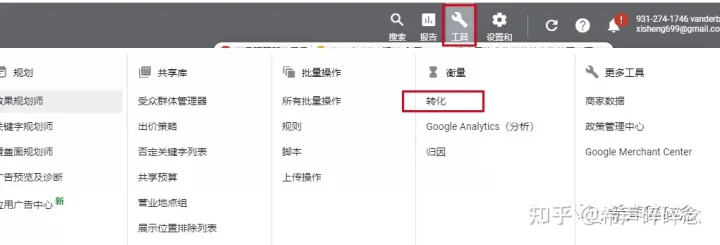 shopify
然后点击“+”按钮,选择“网站”
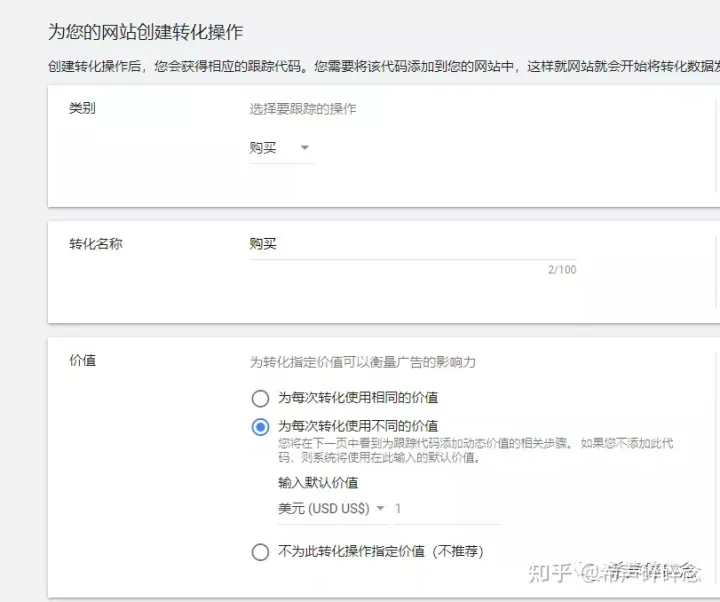
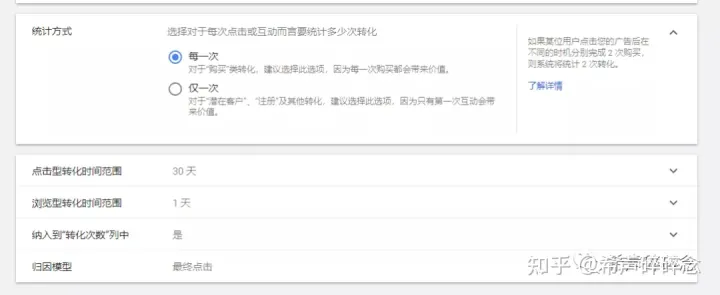
然后下面的设置,一般按照以下的设置即可,注意,价值选项里面的货币最好选择你目标市场的货币。
后面的数值不要填写,就空着,原因是因为一般我们商店里的产品价格都不一样,所以客户每次下单的金额也不一样,填写了反而不精准,在最后添加代码的时候,我们只要加一段代码进去,就能使得谷歌广告自动记录每次下单的金额。
 shopify
 shopify
然后选择“创建并继续”
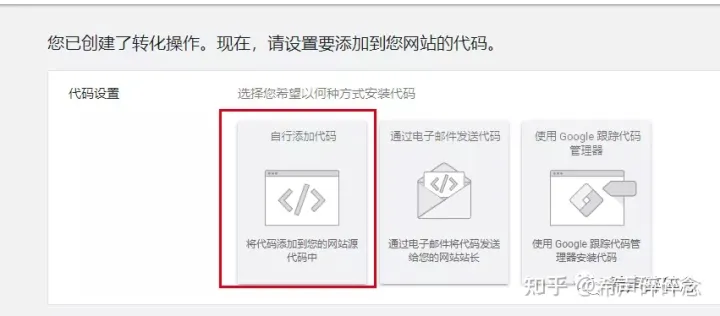
选择“自行添加代码”
 shopify
然后,就会出现两段代码,全局网站代码和事件代码段
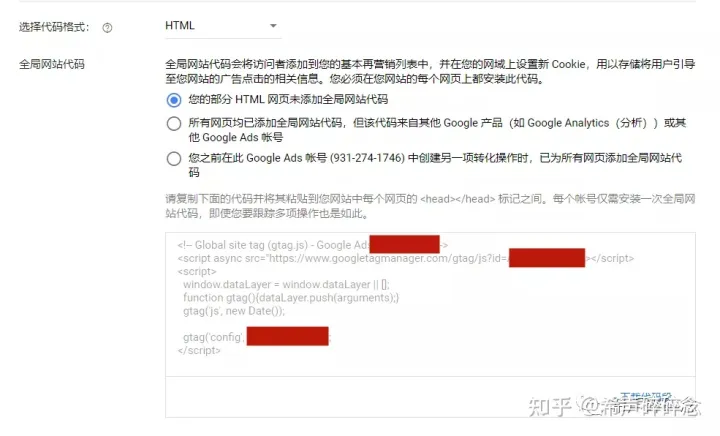 shopify
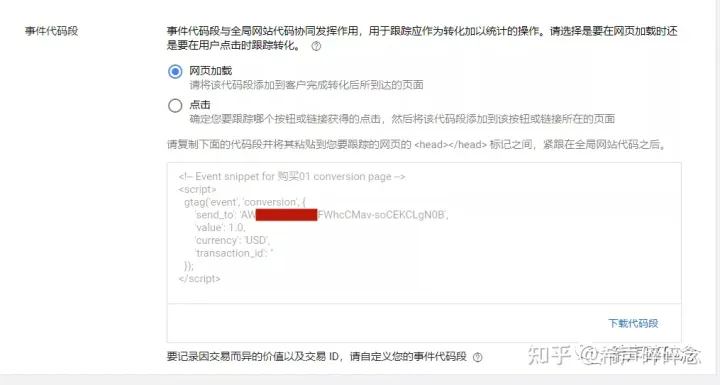 shopify
我们把这两段代码分别复制出来,一个在上,一个在下,比如这样:
<!-- Global site tag (gtag.js) - Google Ads: xxxxxxx -->
<script async src="https://www.googletagmanager.com/gtag/js?id=AW-xxxxx"></script>
<script>
window.dataLayer = window.dataLayer || [];
function gtag(){dataLayer.push(arguments);}
gtag('js', new Date());
gtag('config', 'AW-xxxxxxxx');
</script>
<!-- Event snippet for 购买 conversion page -->
<script>
gtag('event', 'conversion', {
'send_to': 'AW-xxxxxxx/FWhcCMav-soCEKCLgN0B',
'value': 1.0,
'currency': 'USD',
'transaction_id': ''
});
</script>
注意,要复制你们自己的谷歌后台代码,不能直接用我这个。
然后把我上面文字标红的文字,分别替换成下面这两段代码:
'value': {{ checkout.total_price | money_without_currency }},
'transaction_id': '{{ order.order_number }}'
替换之后,就是这样:
<!-- Global site tag (gtag.js) - Google Ads: xxxxxxx -->
<script async src="https://www.googletagmanager.com/gtag/js?id=AW-xxxxx"></script>
<script>
window.dataLayer = window.dataLayer || [];
function gtag(){dataLayer.push(arguments);}
gtag('js', new Date());
gtag('config', 'AW-xxxxxxxx');
</script>
<!-- Event snippet for 购买 conversion page -->
<script>
gtag('event', 'conversion', {
'send_to': 'AW-xxxxxxx/FWhcCMav-soCEKCLgN0B',
'value': {{ checkout.total_price | money_without_currency }},
'currency': 'USD',
'transaction_id': '{{ order.order_number }}'
});
</script>
第一段代码是为了能够自动根据客户的下单金额来计算价值,说通俗点就是能够让谷歌广告确切知道这一单是多少钱。
第二段代码是为了去掉重复的订单。比如有时候客户下单了,但是在下单成功的页面给刷新了一下,不增加这第二段代码,就会被重复记录金额了。
然后,我们就把这段处理好的代码粘贴到我们的shopify后台
“设定”——“结账”——“订单处理”
把代码粘贴到“其他指令碼”这个框里面,点击保存
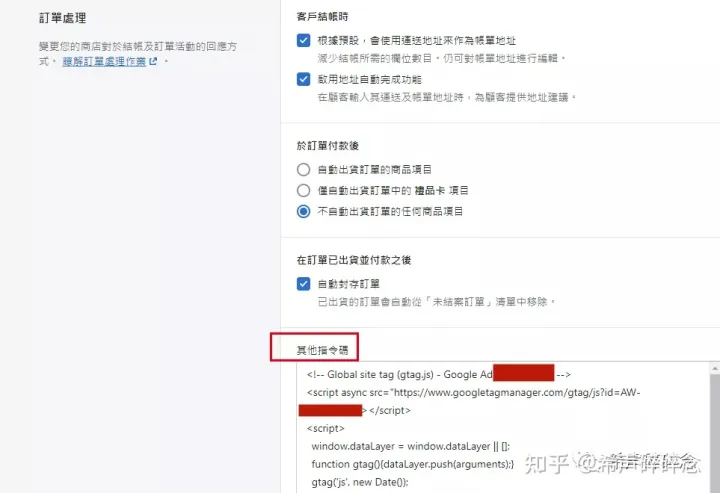 shopify
回到谷歌后台,点击“下一步”,“保存”,全部搞定啦~