Alanbase is a SaaS platform for creating affiliate programs and optimizing performance marketing.
Alanbase is a SaaS platform for creating affiliate programs and optimizing performance marketing. The tool adapts to any niche and vertical. You can launch both an affiliate program for the brand and create your own multi-vertical CPA network. In addition, the platform is useful for media buying teams, allowing to track targeted actions and evaluate the effectiveness of various traffic sources with flexible management.
Alanbase can launch an affiliate program in almost any vertical:
1、iGaming: gambling, betting, poker, etc.;
2、White E-commerce;
3、Desktop and mobile games;
4、Subscription products;
5、Information products;
6、Ed-Tech.
Since the team helps with adapting the system to the needs of the client, you can launch products in any vertical. There are also ready-made instances for gaming, e-commerce, and mobile.
The main advantages:
1、Fast support — they work 24/7;
2、Easy and fast integration;
3、The ability to track and display any arbitrary goals and events in statistics;
4、Calculation of complex goals: sums, thresholds, qualifications, etc.;
5、User statistics based on proprietary column formulas and diagrams in real time;
6、Cohort analysis using proprietary formulas and columns allows you to evaluate the effectiveness of traffic;
7、The ability to track by promo codes and external leads;
8、NGR calculation using arbitrary formulas that are easily configured in the system interface;
Aalanbase provides features such as:
1、Distributed access for the administrator, partners and advertisers;
2、Several methods of tracking events: referral link, promo codes, external leads;
3、Tracking and providing detailed statistics on various filters and groups;
4、Creating offers with different payment models: CPA, RevShare, Hybrid, qualifications, CPM;
5、Flexible payment management for partners, individual payment systems, automatic payment generation, minimum thresholds for various currencies;
6、Separate balances for CPA and revshara;
7、Customizable dashboards;
8、Conversion Management;
9、Working with landing pages, the ability to add landing pages to offers and products, private landing pages;
10、Flexible role-playing system with the possibility of restrictions for affiliate program managers on viewing other people's partners;
11、Two-factor authentication;
12、Public, private offers, offers with preliminary moderation;
13、IP Whitelist for feedback;
14、Branding: work on your own domains, name, logos;
15、Simple setup;
16、Working with documents: privacy policy and rules for working with the affiliate program;
17、Local and global feedback messages.
18、Private landing page
Alanbase rates
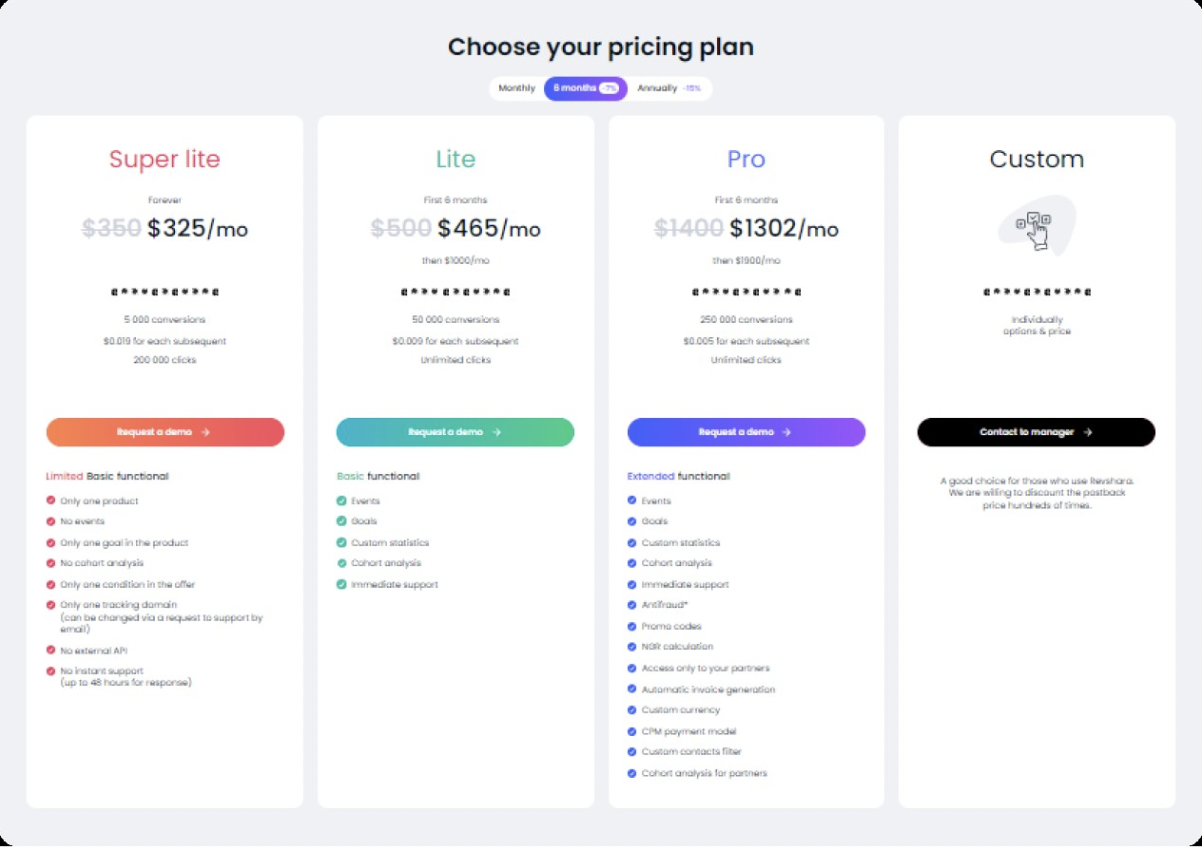
Alanbase has flexible tariffs for customers. You can test the platform for free for 14 days. Find out what features Alanbase provides, and you can also add products and offers to the system.
1、Super lite: from $350/month. The tariff includes 5,000 conversions and 200,000 clicks.
2、Lite: $1000/month. The first 6 months: $500/month. The tariff includes 50,000 conversions and instant support.
3、Pro: $1900/month. First 6 months: $1400/month. The tariff includes 250,000 conversions, instant support, promo codes and an anti-fraud system.
4、Custom: customized options and price.
Registration and getting started
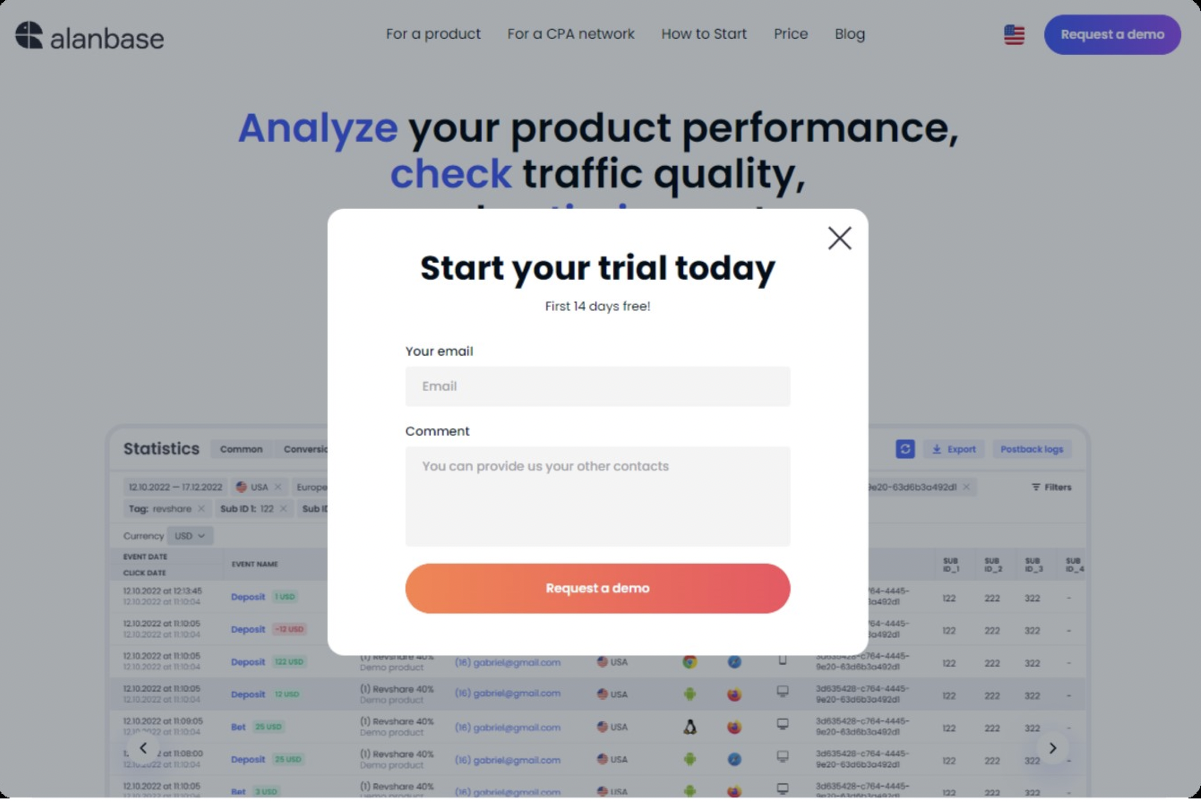
To start working with Alanbase, go to the main page, click "Request demo". A contact form opens in which you need to specify an E-mail address, leave other contacts in the comment field for communication.
How to work with Alanbase
When the manager creates an account, you will be able to log into your personal account.
How to add a product and an offer to the system
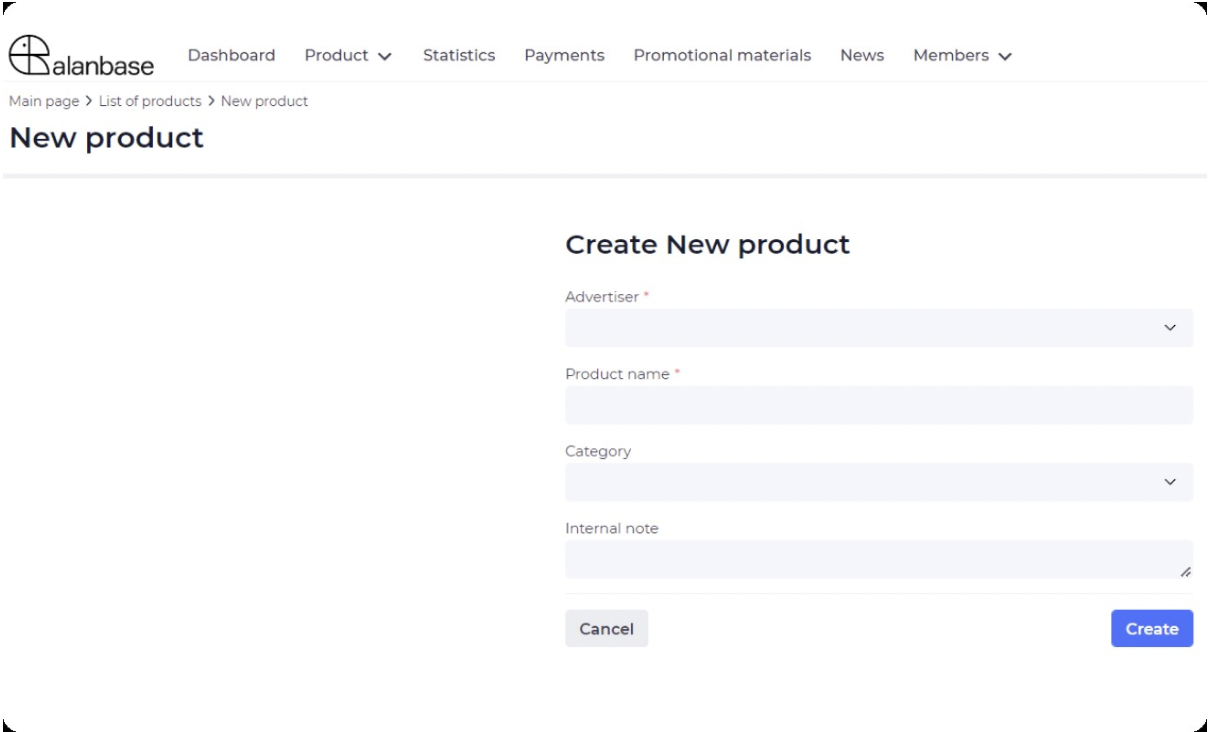
Alanbase has flexible settings. You can add a product, offers, specify all goals, specify conditions and much more. To add a product, open the Products page, click New Product. In the form that opens, select the advertiser, write the name of the products and specify the category. Click "Create".
After creation, the product page opens. By default, the new product is inactive. It will not appear in the partners' personal account. Therefore, you can first add offers, register all events and goals, and make the necessary settings.
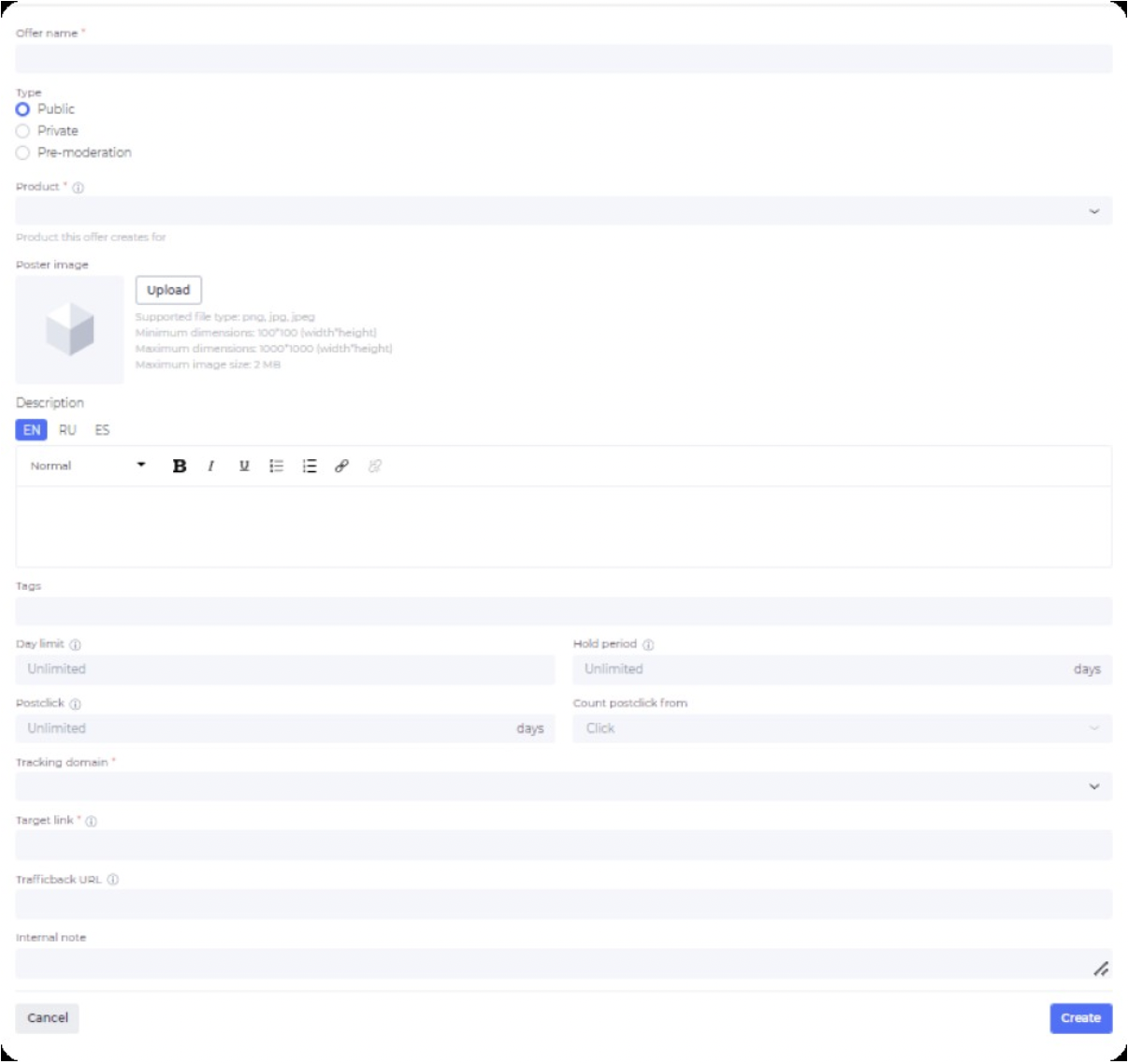
You can add a new offer in the product profile by clicking on the plus sign, or on the page with all offers. Now we will create an offer from the product card. A form will open to add the offer to the system.
Settings:
Title;
Type: public, private, pre-moderation;
Product;
The poster;
Description;
Tags;
Daily limit;
The cold period;
Postclick;
Tracking domain;
Target link;
Traffic back URL.
When you have filled in all the required fields, click "Create". The offer card will open automatically.
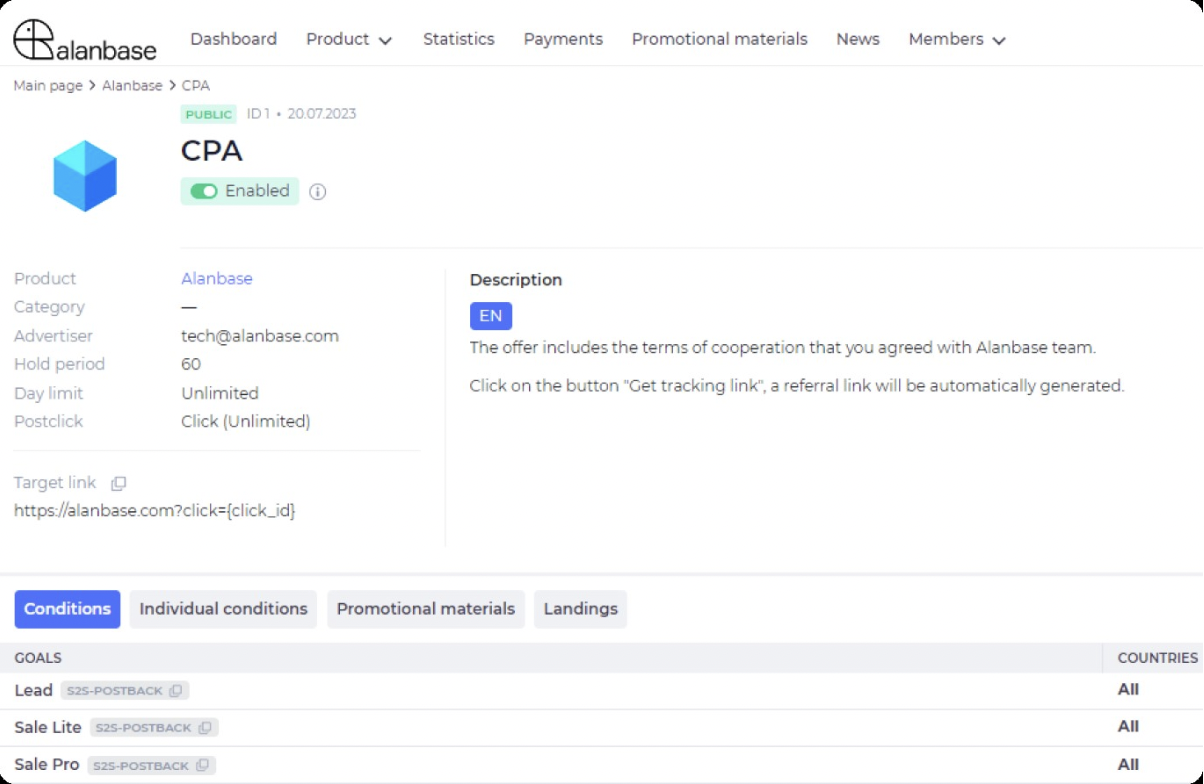
After that, you can specify the conditions for all partners, as well as individual ones. You can also add promo materials and landing pages.
To specify the conditions, you need to add goals and formulas on the product page. Let's look at how to add goals (for example, using the CPA model).
Open the product page, go to the "Goals" field and click on the plus sign.
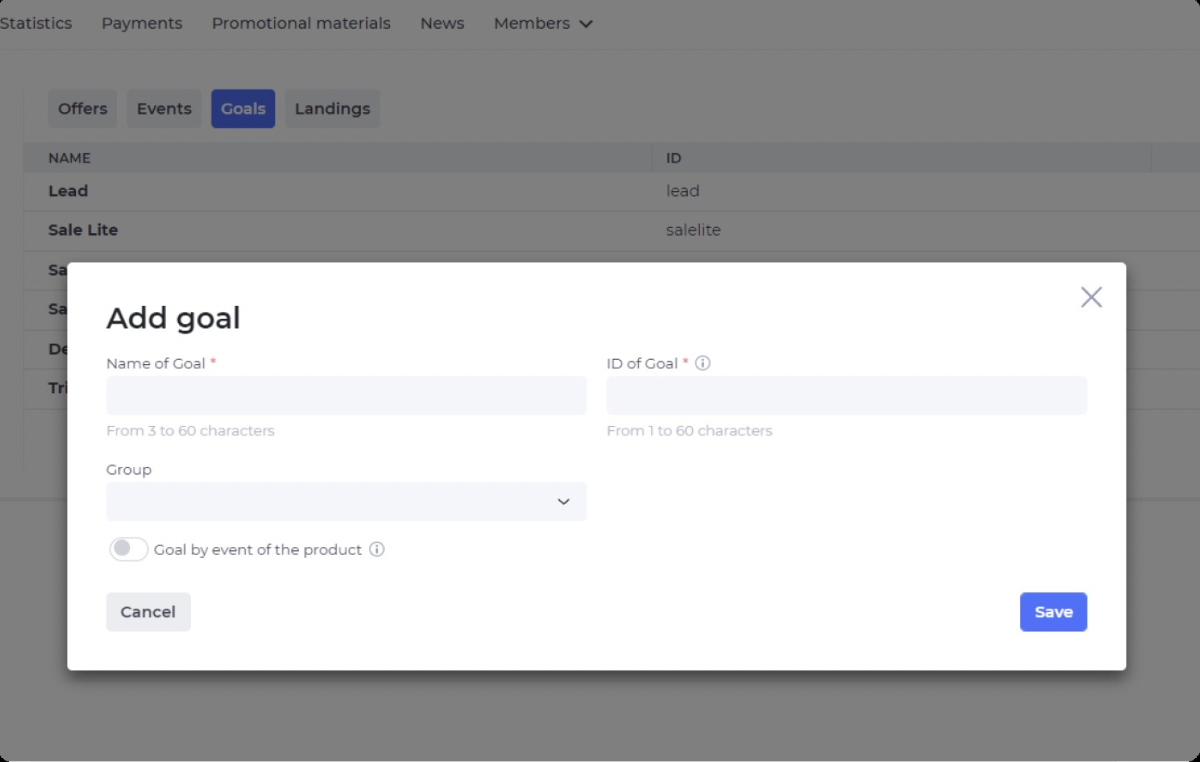
A window opens with the main settings: name, goal ID, group. You can set up a goal based on a product event. In this case, the partner network will independently process the user's actions.
Go to other sections and make the necessary settings. After that, activate the products and offers. They will appear in the partner's personal account.
How to work with users: advertisers, partners and administrators
Alanbase has all the tools for comfortable work with advertisers, partners and administrators. Let's look at what opportunities the platform provides using the example of partners.
The "Users" item is located in the menu. Click on it and go to the Partners page. Active accounts are displayed in one section, and profiles on moderation are displayed on another. Therefore, the manager can quickly view the partners who are waiting for profile activation.
The page displays basic information:
E-mail;
Linked Manager;
Balance;
Hold;
Revshara's balance;
Balance of the revshara hold;
Referral balance;
Hold referral balance;
Status;
Tags;
Date of creation.
Each account has a "Sign in" button. If the partner has difficulties and needs prompt help with the settings inside the personal account, the manager can enter the account and help.
Flexible statistics settings
Statistics are one of the main tools for effective work. Partners can analyze the results of advertising campaigns, and managers can see general statistics and analyze the results of each partner. In this regard, Alanbase has worked out all aspects so that you have a complete picture of traffic, conversions, and users. You can set up different statistics schemes — separately for admins and separately for partners.
A feature has recently appeared — private statistics. Within the same cabinet, you can create several statistics and set distributed access to admins and partners. For example, if there are several projects in the holding, you can create a status for individual projects. Then you can grant access to statistics to partners who work on a specific project.
Another example is if there are in—house offers and resale offers, then you can separate the statistics for each type of product. You can give separate access to statistics to those who work with inhouse offers, and separately to partners with resale offers
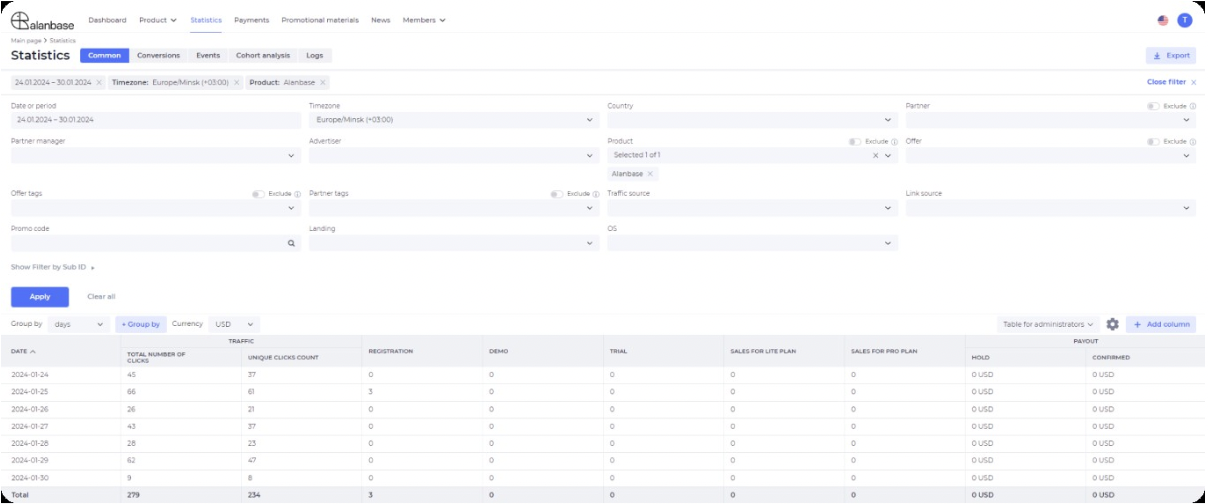
You can configure the necessary parameters for partners. To do this, click on the settings button and select the parameters to display.
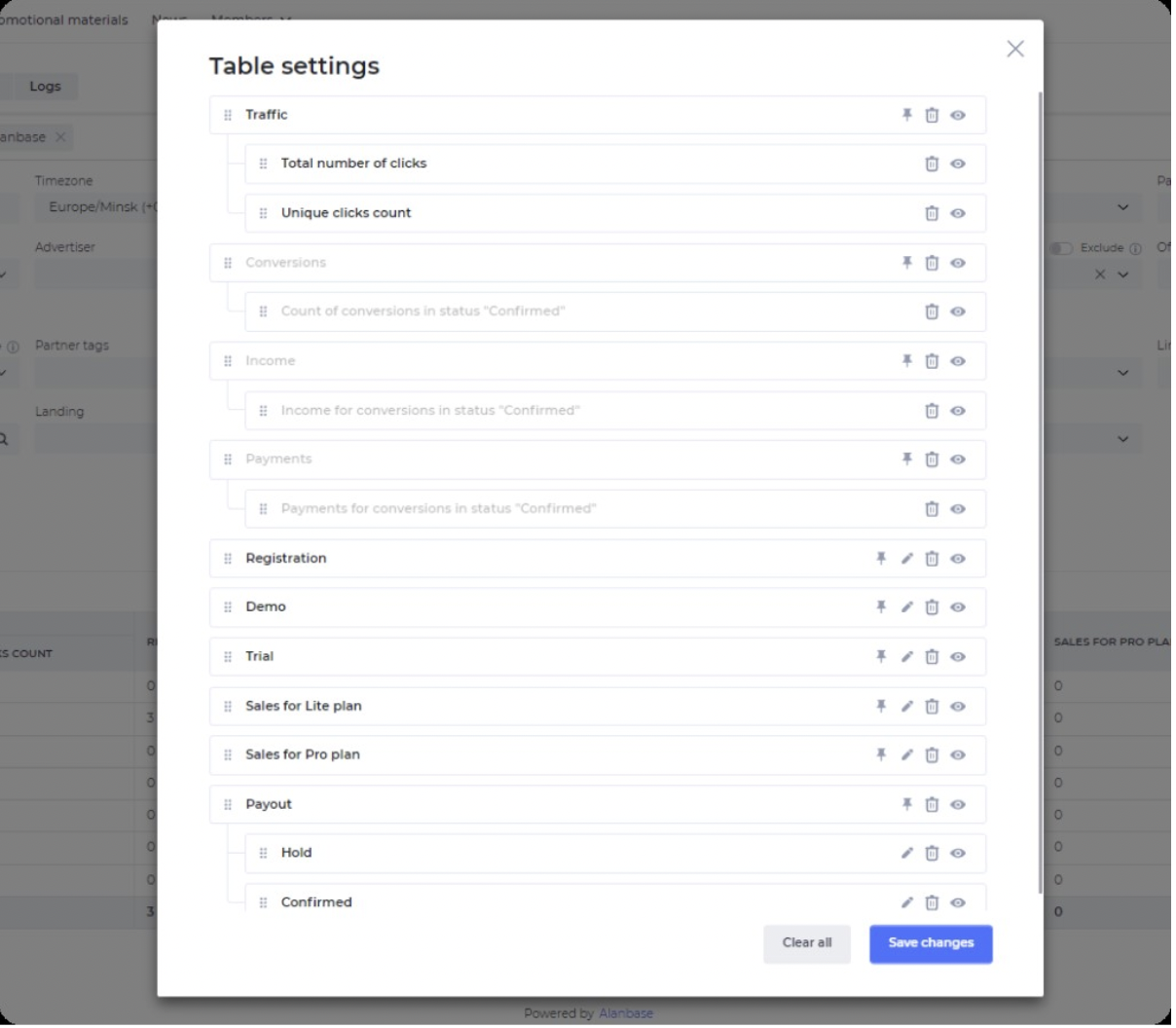
You can add any indicator to Alanbase. You are building a statistics page yourself. For example, you can add the following sections:
Traffic;
Number of registrations;
Number of Qualifications;
Income by qualifications;
Income;
Reg2dep;
And others.
The platform has flexible settings. Therefore, you can create any parameters and configure statistics so that partners can effectively use the information to optimize campaigns.
Alanbase has been in the market since 2020 and has already earned a reputation as a reliable partner for 50+ clients, including Glory Partners, 4rabet, Profit House, Ice Leads and others.
If it seems that Alanbase is what your project needs, register for a demo call with our manager. During the call, we will gather your software requirements and prepare you for a 14-day trial period. Follow this link and gain access to personally test the service.