t's easy to make mistakes that can hinder the accuracy and reliability of the data collected. Avoid them with this detailed guide for GA4.
If you had a chance to read previous guides we’ve published on Google Analytics 4 (GA4), you probably know that it is not a plug-and-play analytics tool like Universal Analytics was.
There is a lot of information one needs to absorb in order to be able to set up GA4 properly, and time is ticking.
With GA4 being a more complex tool, it’s easy to make mistakes that can hinder the accuracy and reliability of the data collected.
In this article, we will explore five common Google Analytics 4 mistakes that can easily happen and provide practical tips to avoid them.
1.Not Setting Data Retention Period
GA4 comes with a two-month data retention period by default, and you have the option to set it to 14 months. The retention period is applied to custom reports in explorations, whereas data in the standard reports never expire.
Once the retention period has passed, data will be automatically deleted – which means if you don’t change that setting as you set up GA4, you will not be able to run YoY custom reports and will lose valuable historical data.
In order to change the retention period, navigate to Data Settings > Date Retention, and in the dropdown, choose 14 months.

You will also notice a checkbox reading “Reset user data on new activity,” which means the 14-month data retention period is counted from the moment of the user’s last visit onwards.
In other words, each time a user engages in a new activity, their data retention period gets extended for another 14 months.
Honestly, I can’t think of a use case when you would choose to turn that option off, so I keep it switched on.
2. Dimensions With High Cardinality
High-cardinality dimensions are dimensions that contain more than 500 unique values within a single day. This can present challenges and limitations in data analysis within GA4.
Cardinality in GA4 can negatively affect data accuracy and reliability.
For example, when you track the exact word count as a custom dimension on every article page, you may end up having high cardinality if you have thousands of articles because the word count can be different for every article.
How To Fix High Cardinality
To mitigate the impact of high cardinality in GA4, consider creating a bucket of values.
With the example above of word count custom dimension, it really doesn’t matter that much whether the article will have 500 or 501 words. You can bucket values into ranges like:
<500.
500-1000.
1001-1500.
1501-2000.
+2000.
And instead of pushing too many distinct values, you will have only five different dimensions.
Also, as a best practice, always define custom dimensions wisely.
Ensure that custom dimensions align with your analysis objectives and consider their potential impact on data accuracy and resource consumption.
3. Not Linking To BigQuery Account
Linking to BigQuery was available in Universal Analytics 360 but not in the free version. With GA4 now, all users have access to that premium feature.
Since it is exporting data to BigQuery from the moment you connect, it’s important to set it up at the beginning in order to have as much historical data as possible.
BigQuery has a big advantage over GA4 custom reports as data is never sampled, whereas in custom reports, data will be sampled if there are more than 10M events in the exploration report.
In order to link GA4 to BigQuery, navigate to BigQuery Links in your GA4 settings.
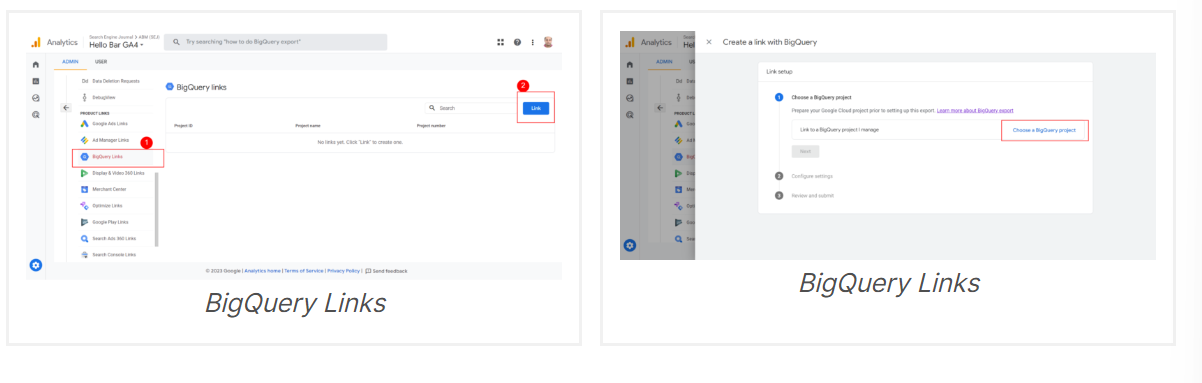
BigQuery Links
BigQuery Links
BigQuery Links
BigQuery Links
In order to complete linking to BigQuery, you would need to create a BigQuery project which will require you to enter your billing information.
It is freemium, and 10 GB is free each month; it will charge you $0.02 per GB if you exceed that number.
4. Failing To Set Up Custom Audiences
GA4 has powerful audience-building capabilities you can read more about in our guide on how to create segments and audiences.
With GA4 audiences, you can analyze specific data segments, empowering you to derive valuable insights. For instance, you can create target audiences such as engaged users, subscribed users, or users who made a purchase in the past 30 days.
It is advisable to create audiences for your ICP and mark it as a conversion.
Since audience dates are not retroactive, it is important to define your target audiences at the beginning of setup in order to gather historical data.
5. Using Auto Migration From Universal Analytics
GA4 is a totally different beast compared to UA, with a different data model.
Even though it offers the option to automatically collect Universal Analytics events, it is better not to use that, as it is a chance to rethink your analytics and design your event collection architecture anew for better analytics.

Collect Universal Analytics Events
Collect Universal Analytics events.
6. Not Excluding Unwanted Referrals
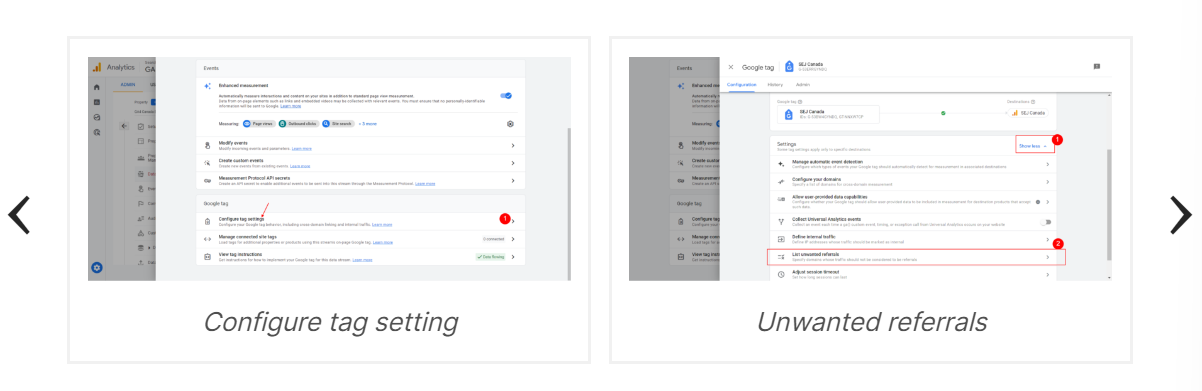
Often ecommerce websites have third-party payment processors which are hosted under different domains – and when redirecting them back to the website after the user completes a checkout, GA will detect it as a new session because the referral is different.
In order to avoid that and not distort your conversions data, you need to exclude such domains from referrals so GA doesn’t initiate a new session.
At SEJ, for example, we have the short link “sejr.nl” domain, which should be treated as the same domain – so we added it to our exclusion list.
Also, if you have subdomains and want to track across subdomains using the same GA4 property, you need to exclude your own domain from referrals in order to keep the same session when users navigate from one subdomain to your main domain.
7. Not Choosing The Right Reporting Identity
The following reporting identity options are available in GA4:
Blended.
Observed.
Device-based.

Reporting identity option
Reporting identity option.
The good news is you can switch back and forth between these options anytime, and it will reflect in your custom exploration reports.
But I would like to mention why it’s important to choose the right option according to your business case.
If you don’t have login and user IDs on your website, 99% of cases should go with “device-based,” because the other two options may distort your conversions data.
The reason is the user’s privacy. With Google signals enabled, GA uses user IDs to track users across devices, then matches them if they are logged in to their Google service accounts on different devices – and there is a chance that user identity may be exposed.
In such cases, it hides user data from the reports and models data based on user behavior. Modeling of data can introduce some level of inaccuracy because it’s an estimation rather than an exact measurement.
With modeled and observed options, you will often notice “Data thresholds are applied” in your reports which have implications for data accuracy.
Treasholding applied
Thresholding applied.

You may try switching between these options and see how your data is changing.
If you notice a significant difference in the number of conversions between blended, observed identities, and device-based, it may be preferable to use the latter option.
Device-based identity works similarly to how Universal Analytics tracking works.
Conclusion
In conclusion, it is crucial to avoid common configuration mistakes when setting up Google Analytics 4 to ensure accurate and reliable data collection.
By understanding these potential pitfalls and taking the necessary measures, you can make the most of GA4’s capabilities and derive meaningful insights for your website or application.
Additionally, GA4 requires ongoing maintenance rather than a one-time setup.
Failing to regularly monitor and analyze your data can lead to missed opportunities and make it difficult to identify and address issues on time.